Blog
What Is Faceted Search? A Guide for Online Stores
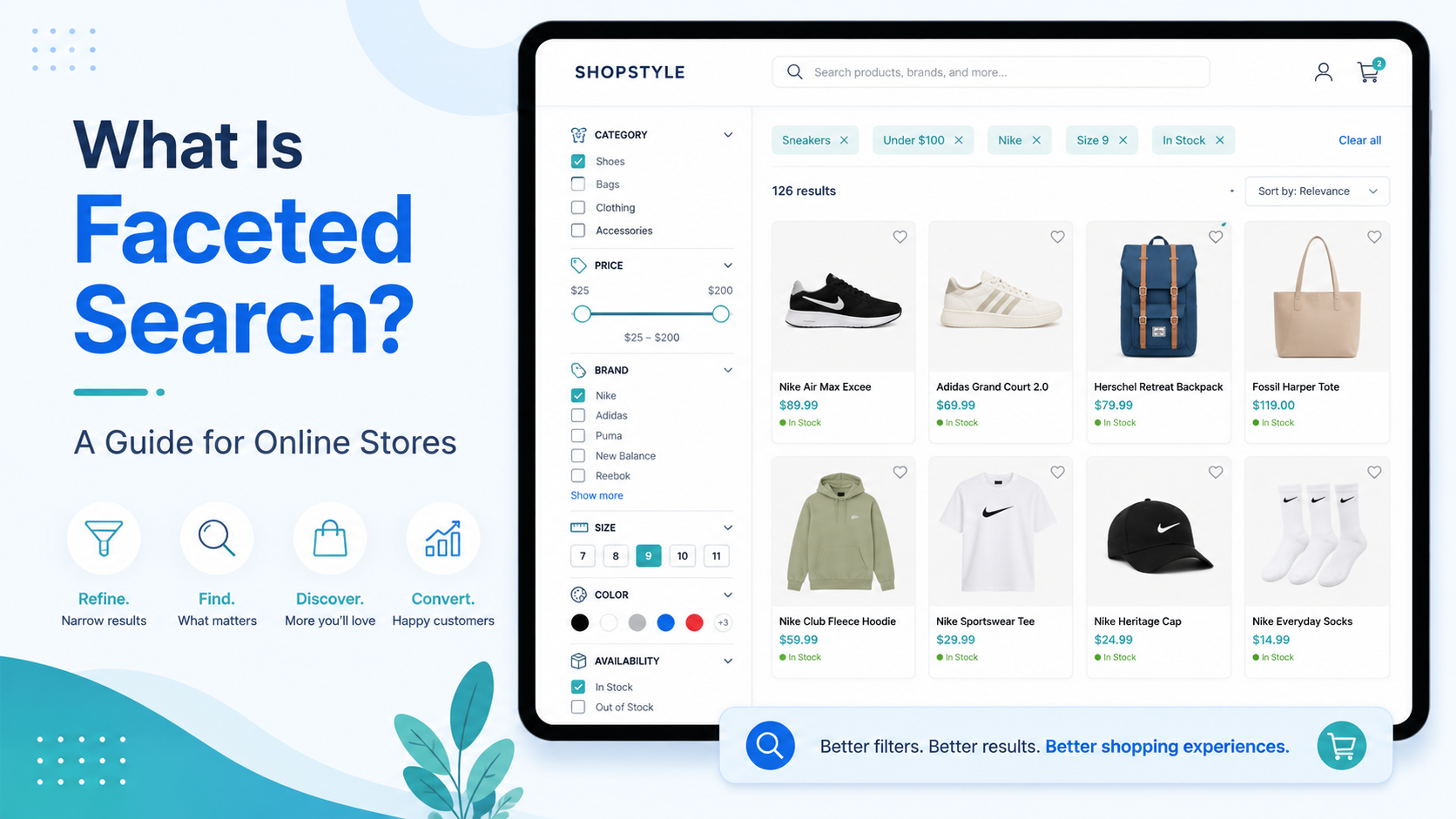
What Is Faceted Search?
Faceted search is a search and navigation pattern that allows users to filter a set of results by multiple attributes simultaneously. On an ecommerce store, this typically means a filter panel on a search results or category page where shoppers can narrow down products by characteristics such as colour, size, brand, price range, material, or any other attribute that is relevant to that product type.
The word "facet" comes from the idea that a product has multiple dimensions or faces that can be used to describe and filter it. A pair of boots, for example, has facets including shoe size, colour, material, heel height, and price. Faceted search lets a shopper apply constraints across all of these dimensions at once — "show me black leather ankle boots in size 6, priced under £120" — without writing that sentence into a search box.
Why Faceted Search Matters for Ecommerce
The core value of faceted search is that it meets shoppers at different stages of certainty. Not every shopper arrives with a precise product in mind. Many arrive with a category in mind and a set of constraints, and need the navigation tools to narrow from broad to specific.
Consider a shopper who knows they want a sofa but has not yet decided on colour or size. They type "sofa" into the search bar and land on a results page showing hundreds of options. Without faceted filters, their only options are to scroll through hundreds of products or refine their search query and start again. With faceted filters, they can set colour to "grey", width to "3-seater", and price to "£500-£1,000" in a few clicks, and their results page immediately updates to a manageable shortlist.
This guided narrowing process is more natural for many shoppers than composing a precise search query. It also reduces the no-results rate, because filtering down from a broad result set is less likely to produce an empty page than progressively constraining a keyword query.
The Components of a Faceted Search Interface
A well-implemented faceted search interface has several key components.
The filter panel. Typically displayed on the left side of a results page (or behind a filter button on mobile), this panel shows available facets as groups of checkboxes, radio buttons, or range sliders. Each group represents one attribute: brand, colour, size, price, and so on.
Dynamic facet counts. Next to each filter option, the number of matching products should update in real time as filters are applied. This tells the shopper whether a choice will narrow the results to a useful set or to zero — preventing frustrating dead ends.
The price range slider. Price is almost universally useful as a facet, and a range slider is a more intuitive control than a list of price bands. Shoppers can drag to set a minimum and maximum and see results update immediately.
Active filter display. The currently applied filters should be visible somewhere prominent — typically above the results grid — with easy "remove" buttons. A shopper who has applied four filters should be able to see what they set and remove individual filters without clearing everything.
Sort options. Sorting (by relevance, price ascending, price descending, newest) is a complement to filtering. Some shoppers filter first then sort; others sort first then filter. Supporting both workflows matters.
Results count. The total number of products matching the current filter set should be displayed and should update dynamically. This confirms to the shopper that their filter choice has been applied.
Designing Facets for Your Product Catalogue
The right facet set is catalogue-specific. Generic facets like "brand" and "price" apply to almost every store, but category-specific facets are what separate good implementations from great ones.
A clothing store should offer: size, colour, material, fit type, occasion, and season. A tool store should offer: voltage/power, application, brand, cordless/corded, and weight. A jewellery store should offer: metal type, gemstone, style, occasion, and price. A home furniture store should offer: room, material, colour, dimensions, and assembly required.
Getting these right requires understanding how your shoppers actually make decisions, not just how your product data is structured. Review your search analytics to see what attribute-specific queries appear — "leather brown", "size 10 wide", "under £50 red" — and make sure those dimensions exist as facets.
Technical Requirements for Fast Faceted Search
Faceted search is technically demanding because it requires not just filtering, but counting matching products per filter option in real time. For every filter the shopper might apply, the engine needs to know how many products would remain in each facet bucket.
On a large catalogue, doing this computation at query time against a live database is prohibitively slow. Purpose-built search engines pre-compute these counts as part of the indexing process, so that a filter applied on the front end resolves in milliseconds rather than seconds.
This is one of the key reasons dedicated search engines like Search Sight dramatically outperform default WooCommerce or Shopify search on faceted navigation. The results page — with all its filters, counts, and a price slider — updates in under 50ms on a store with tens of thousands of products.
Faceted Search and SEO
There is a common concern that faceted search creates duplicate content problems for SEO — if every filter combination generates a unique URL, search engines may index hundreds of thin, duplicated pages. This is a real risk with poorly implemented faceted navigation.
The solutions are well established: use canonical tags to point filter-combination URLs back to the base category or results URL, or implement filters as JavaScript state without URL parameters (AJAX-driven filtering). Both approaches let shoppers use the full filter set without generating harmful duplicate content for search engines.
For a full introduction to ecommerce site search, including how faceted search fits into the bigger picture, visit the ecommerce search hub.
For the practical side of reducing search failures, see How to Reduce No-Results Searches in Your Store.
Start your free 14-day trial to get instant, faceted search on your store today.