Blog
Predictive Search Explained (and Why It Lifts Conversions)
What Is Predictive Search?
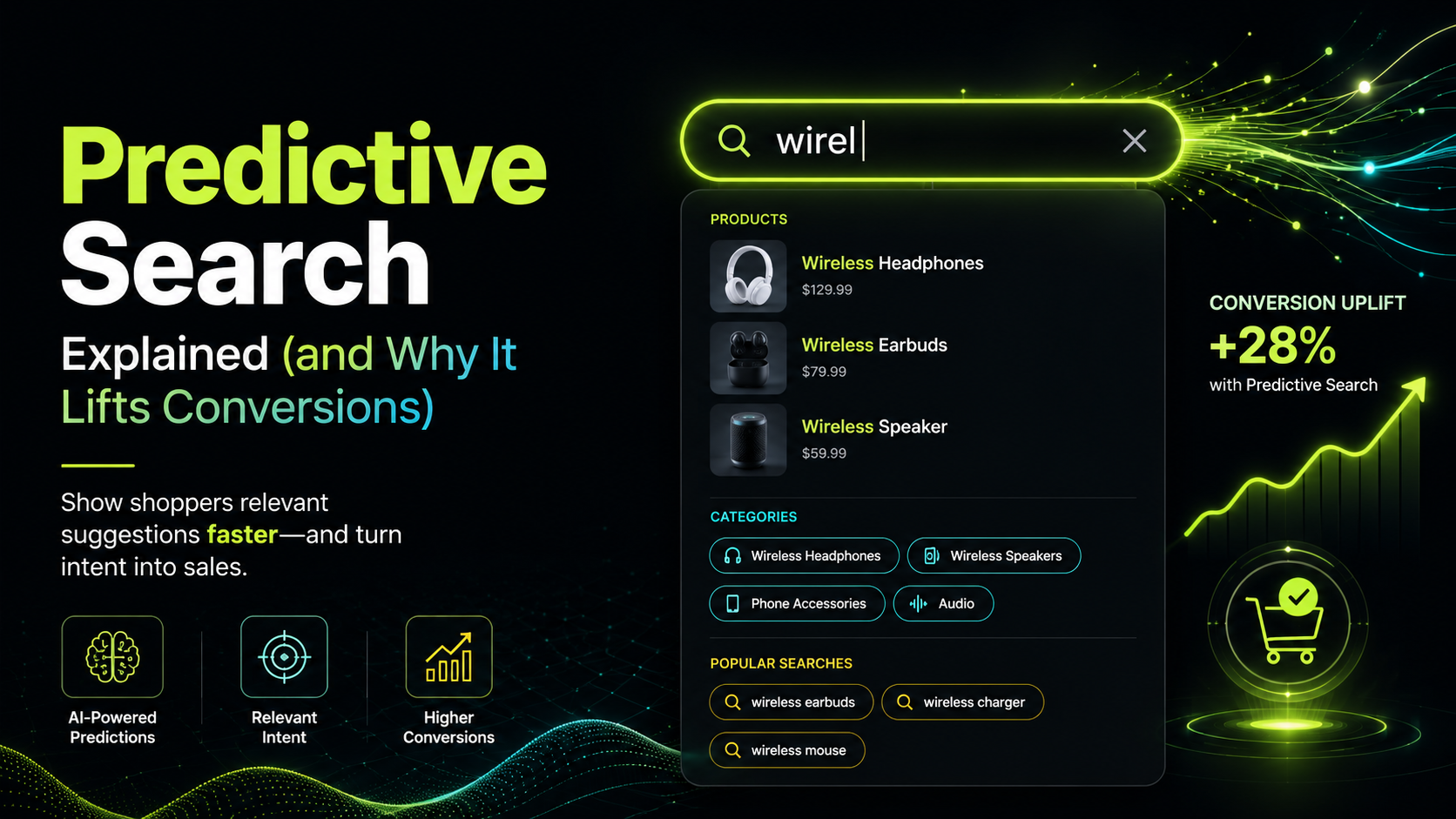
Predictive search is the feature that displays search suggestions and product results as a shopper types their query, before they press Enter or submit the search form. You have seen it on every major retailer's website: a dropdown or overlay appears under the search bar, updating in real time with each keystroke, showing product images, names, and prices that match the partial query.
The word "predictive" refers to the engine's ability to anticipate what the shopper is looking for before they have finished expressing it. When someone types "run" into a sports retailer's search bar, a predictive search engine surfaces "running shoes", "running jackets", and "running socks" — not because it read the shopper's mind, but because it has learned from query patterns that these are the most likely completions and most relevant products.
How Predictive Search Works Technically
For predictive search to feel instant, it must complete within the shopper's natural typing rhythm — typically well under 100ms per keystroke. This requires:
A pre-built index. The search engine does not query a live database on each keystroke. It queries a pre-computed index that has already processed all products, attributes, and historical query data. This is why good predictive search can respond in under 50ms even on stores with tens of thousands of products.
AJAX or API-driven results. Each keystroke triggers an asynchronous request to the search API. The results are rendered in the page overlay without a full page reload, which is what makes the experience feel seamless.
Debouncing. The UI does not fire a new request on literally every keystroke — it waits for a brief pause (typically 100-200ms) before sending the query. This prevents unnecessary API calls while still feeling responsive.
Typo tolerance at partial-query stage. A partial query like "boo" should surface "boots", "bookcases", and "bookends", not fail because "boo" is not a complete word in the catalogue. This requires a search index designed around prefix matching and fuzzy completion.
Search Sight's AJAX autocomplete delivers this full stack out of the box, with results appearing under the search bar as the shopper types.
What Predictive Search Should Show
A well-designed predictive search overlay typically contains several layers of information:
- Suggested queries — completions of the partial query that are popular or relevant.
- Product suggestions — actual products that match the partial query, with thumbnail images, names, and prices.
- Category shortcuts — links to category pages that match the query, useful when a shopper is still in a browsing mode.
- Featured products — merchandised items that the store wants to promote for certain query patterns.
Not every store needs all of these layers, but product suggestions with images are consistently the highest-converting element. A shopper who can see a product image and price in the autocomplete dropdown is much closer to an add-to-cart decision than one who reads a list of text suggestions.
Why Predictive Search Lifts Conversions
The conversion argument for predictive search rests on several mechanisms.
Reduced friction. Every extra click or keystroke is a small friction point. Predictive search reduces the number of steps between intent and product — in the best case, a shopper sees exactly what they want in the autocomplete dropdown and clicks straight to the product page, skipping the results page entirely.
Error prevention. If a shopper is typing a misspelled word, a good predictive engine will complete it correctly before the misspelling is finished. The shopper never sees a no-results page because they never submitted a broken query.
Discovery of alternatives. When a shopper types a broad term, the predictive overlay can surface related products they had not considered. This is a lightweight passive discovery mechanism built into an active search interaction.
Confidence and trust. A fast, accurate autocomplete signals that the store is well-run and its search engine is sophisticated. This builds confidence at a moment when the shopper is evaluating whether to commit to browsing further.
Predictive Search and Mobile Commerce
On mobile devices, predictive search is even more important than on desktop. Typing on a small keyboard is slow and error-prone. A predictive engine that offers accurate completions after two or three characters dramatically reduces the typing burden, which directly reduces the chance of a shopper giving up mid-query.
For mobile performance, the response time standard is particularly strict. Any perceptible delay in updating autocomplete suggestions on mobile causes shoppers to pause and lose focus. Sub-50ms response times are not a luxury on mobile — they are the floor for a usable experience.
Integrating Predictive Search with the Full Search Experience
Predictive search is not a standalone feature — it is the entry point to a broader search and discovery flow. When a shopper submits a query from the autocomplete overlay, they land on a full results page with faceted filters, sorting options, and a complete product grid. The quality of that results page matters as much as the autocomplete experience.
For the full picture on faceted results pages, see What Is Faceted Search?. For the broader context of how search drives product discovery, see What Is Product Discovery in Ecommerce?.
What to Look for in a Predictive Search Implementation
When evaluating a predictive search solution, the questions to ask are:
- How fast is it? Response times above 100ms per keystroke will feel sluggish.
- Does it show product images and prices in the autocomplete overlay?
- Does it handle partial queries and typos gracefully?
- Can you merchandise the results — promote certain products or categories for specific query patterns?
- Does it work on mobile without a performance penalty?
- Is it easy to install and maintain without developer involvement?
Search Sight's predictive search meets all of these criteria, with sub-50ms responses and an instant AJAX autocomplete widget that replaces your existing search bar without any coding.
Start your free 14-day trial to see predictive search running on your own store's catalogue.
For a complete introduction to ecommerce search, visit the ecommerce search hub.